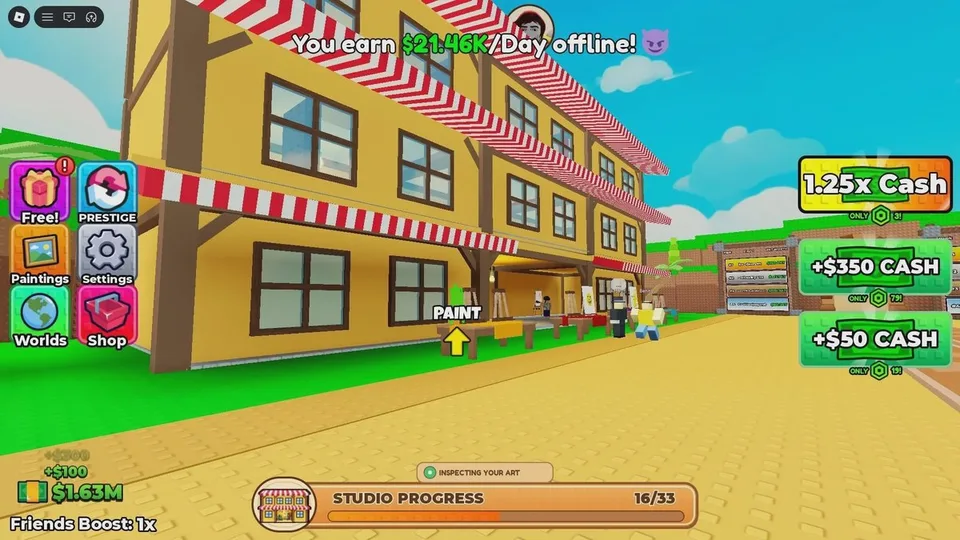
Studio upgrades are the green buttons on your plot. Each one shows a Cash cost. Step on it when you can pay. In return the plot gains a feature such as another artist, a wall, or a ceiling. The documented set is 33 upgrades, and a studio screen can show progress as a fraction of 33. Buying all of them is described as costing upwards of several million Cash. That is a scale, not a shopping list. No public table lists all 33 names and prices.
What expansion changes
Selling pays more in a larger studio. The notes tie buyer traffic and offer quality to how many upgrades you own. Painting harder on the same bare stall does not replace that. Finish canvases so you have Cash, then turn Cash into the next button.
- Paint and sell, using the steps in the first-session guide.
- Read the next progression button you have not bought.
- If you are not saving a specific Prestige Cash target, step on that button.
- Paint again. Better offers are the point of the purchase.
- When the third floor opens, start taking top grades to the auction house.
Hired artists
Some buttons add artists. The official description says you unlock new artists and studio features. They are NPC painters, not a published roster of named characters with separate stats. They produce some Cash while you are doing something else. They are explicitly described as not earning enough to matter for Prestige goals. Buy them when the button is the next affordable studio feature, and still finish your own paintings for Stars and for the sold-painting counter.
No guide lists the artists by name, specialty, or price. If the button shows a name, that label is the one to trust for your version. Do not copy a painter list from a different Roblox art game.
What the notes do not price
A separate cosmetics shop is not part of the sale-and-button notes. If a purchase does not add a studio feature, an artist, display space, or progress toward the auction floor, it is outside the income loop those notes describe. Prefer the green progression buttons while you are still working through the 33-upgrade path.
Do not copy money numbers off promotional images. The cost that matters is printed on the button in your server.
Before you Prestige
Unspent Cash is deleted when you confirm Prestige, along with every button you bought. That does not mean you should buy nothing. Buttons are how you reach the sales, Stars, and Cash the menu asks for. It does mean a balance you already need for the Cash requirement should not be emptied on a late purchase that does not help you meet the line.
The Museum is not one of these 33 starter-studio buttons. Guides report that it opens at Prestige 3, then uses its own upgrade purchases to build a museum. Details are in the Prestige and Museum guide.